
Zgoda — a team’s first two weeks, from sign-up to a second person
- Role
- UI/UX & Product Designer
- Platform
- Web, desktop
- Domain
- SaaSCollaboration
- Team
- Solo concept
- Problem
- In week one, only 17.3% of trial teams had a second person review a draft; 6.5% paid. Clients silently counted as paid seats.
- What I did
- Defined activation, studied 9,000 trials, 1,030 tickets and 16 trialists, then redesigned setup, invites, roles and billing, and shipped it against a holdout.
- Result
- Activation rose from 17.3% to 21.1%. Payment rose to 7.3%, not yet proven. An invite step in setup failed, and role tickets went up.
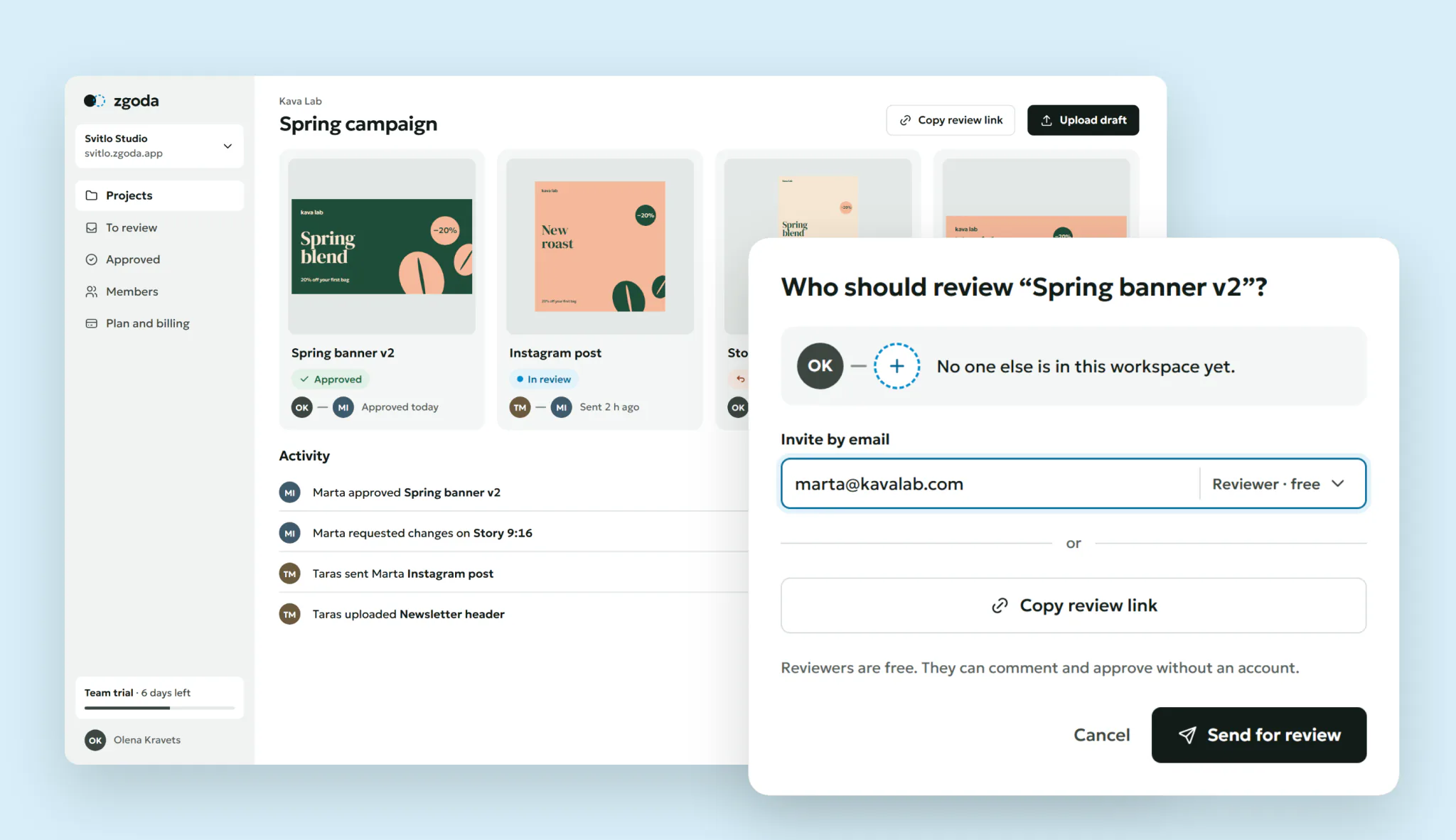
Zgoda is a creative review tool for marketing teams and agencies: one person uploads a draft, another approves it or asks for changes. I redesigned a team’s first two weeks, from sign-up to the decision to pay.
Concept. Product, users and data are fictional. Every interval in the case is computed by a script.
Context
Teams of 2 to 30 people try Zgoda for 14 days on the Team plan, without a card. About 3,000 trials start a month. After the trial a team pays €9 per member a month or stays on Free: 2 members, 3 active projects.
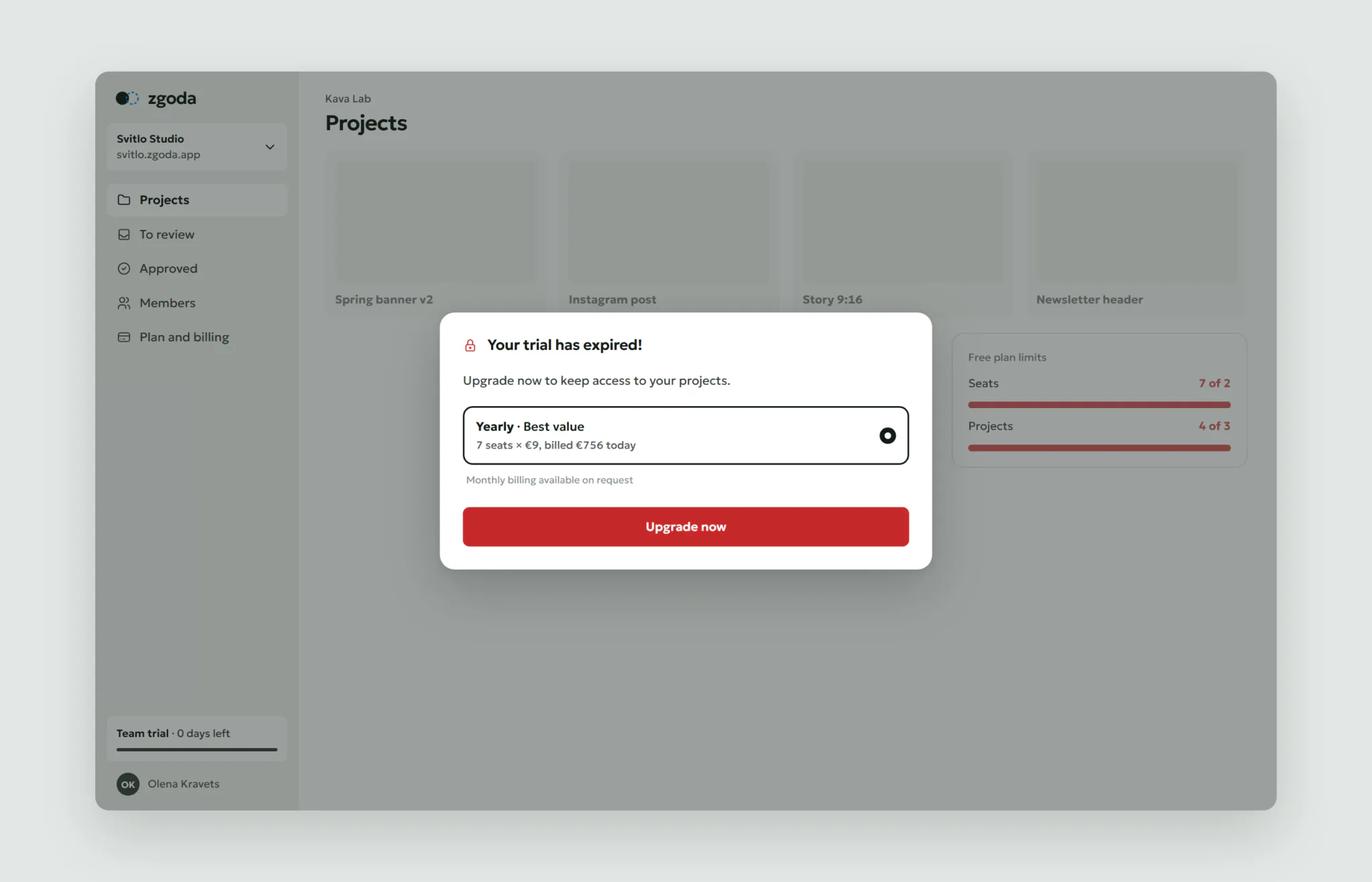
The old trial asked 7 setup questions, then showed an empty page. Clients who only approved drafts took paid seats. On day 15 the whole workspace locked behind a modal with the yearly plan picked.
This is a solo concept, written the way it would run in a team: a growth PM, an analyst, two engineers and me. I ran the research, the design and the rollout plan. Six weeks of design, then a nine-week rollout.
Constraints
- No card at sign-up. Nothing can be charged without asking.
- €9 per member stays. Only who counts as a member can change.
- Sales want company data for lead scoring.
- About 3,000 trials a month. Payment shows after 30 days.
- Billing fixes go to everyone. None is held back to keep a test clean.
Process
First, what “value” means. Zgoda is worth paying for once someone else looks at your work. So activation is a draft from one person getting a decision from another within 7 days. A guest reviewer counts. In Q2, 31.7% of activated teams paid, against 1.2% of the rest. The other candidates predicted payment far worse: “invite sent” (14.3%) and “first upload” (13.2%).
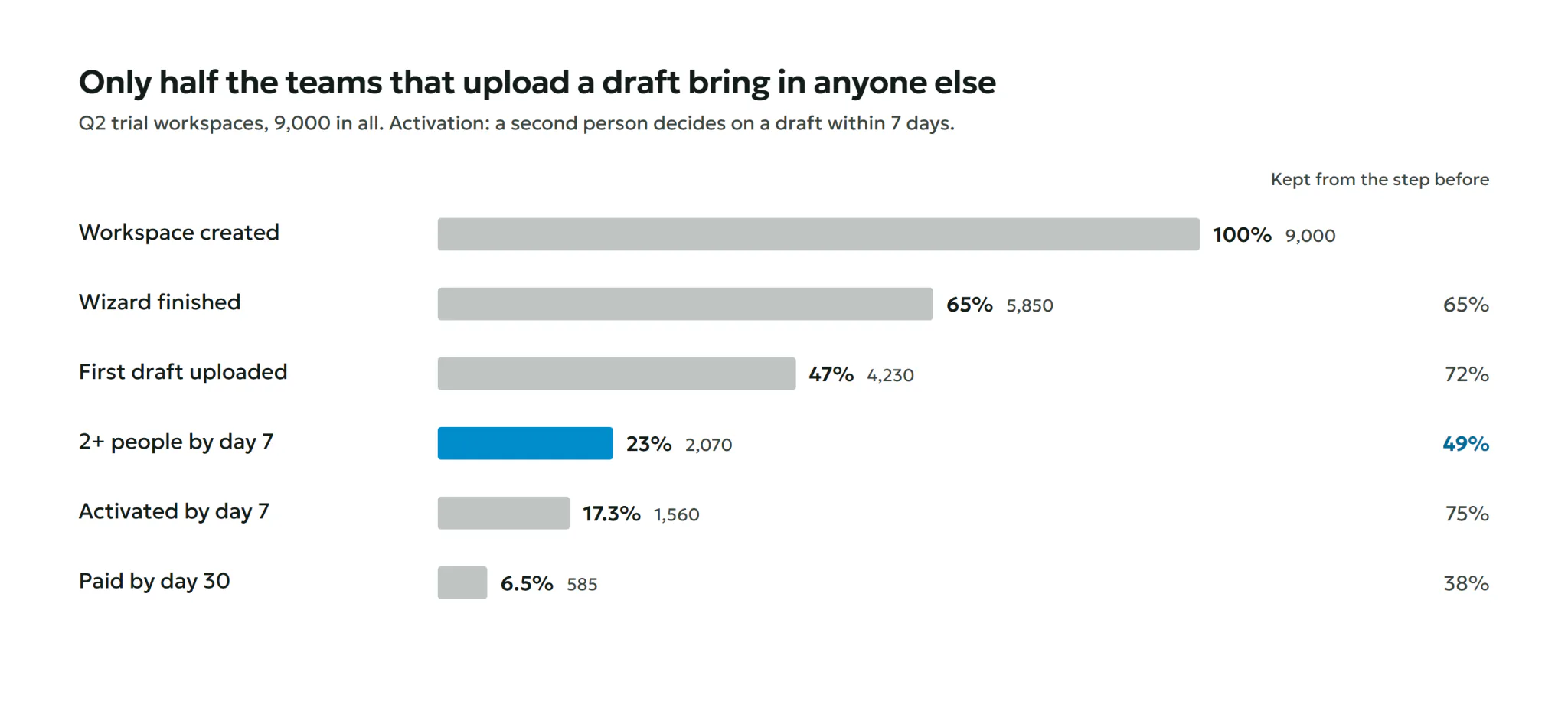
Where teams stop. A step-by-step cohort analysis of 9,000 Q2 trials, at the workspace level. Only half the teams that uploaded a draft brought in anyone else.
Why they stop. 1,030 support tickets from the first 14 days, coded by theme and trial day. The top theme came on days 1–3: “How does my client approve without an account?” Billing peaked on days 12–15. Then 16 interviews: 12 trialists who didn’t pay and 4 who did.
“I invited my two designers right away. They opened it, saw nothing, and went back to Slack.”
Head of marketing, didn’t pay
“The pricing says per user. My client is a user, right?”
Agency owner, didn’t pay
11 of 16 didn’t know what to do after setup. 7 of 12 non-payers held back from inviting a client over price.
What I tested before building. A moderated concept test with 10 team leads. With a sample project after setup, 9 of 10 found the next step, against 4 of 10. Asked what 3 designers and 2 clients would cost, 9 of 10 answered right on the new plan page, against 3 of 10. An “Invite your team” step in setup was called convenient by 8 of 10.
I ranked six hypotheses by ICE. That invite step came first: cheap, standard in SaaS, and sales asked for it.
Key decisions
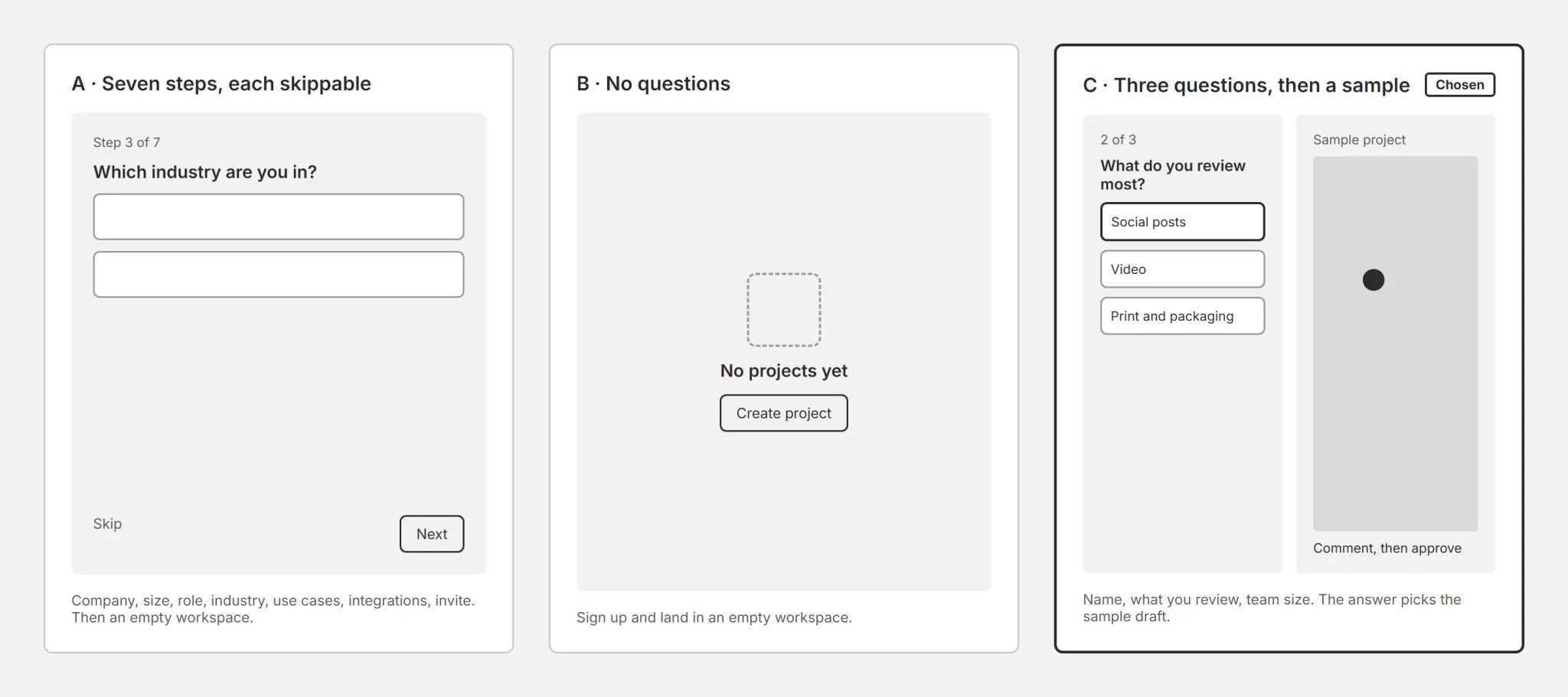
What does setup ask, and what waits?
Options: keep 7 steps and let people skip; no questions at all; three questions, then a sample project. I chose three: each answer changes the next screen. What you review picks the sample draft. Team size shows a bulk invite only for 15 or more. The cost: sales lose industry at sign-up and ask for it later.
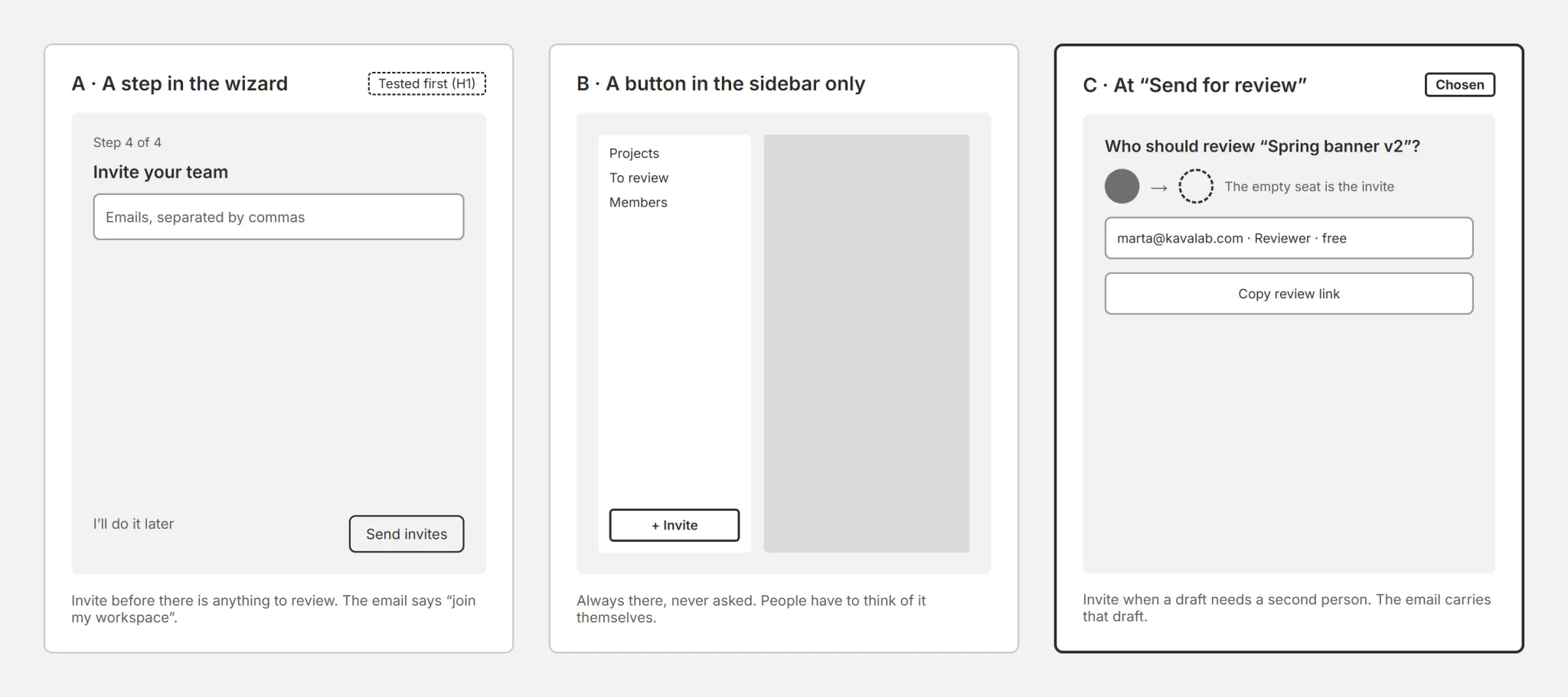
When do we ask for the team?
Options: a step in setup; a button in the sidebar only; at “Send for review”, when a draft needs someone. Setup came first by ICE, so I tested it first, and it failed (see Result). The final answer is the third: the invite carries the draft. The cost: large teams lose the upfront invite, so “15 or more” keeps it in setup.
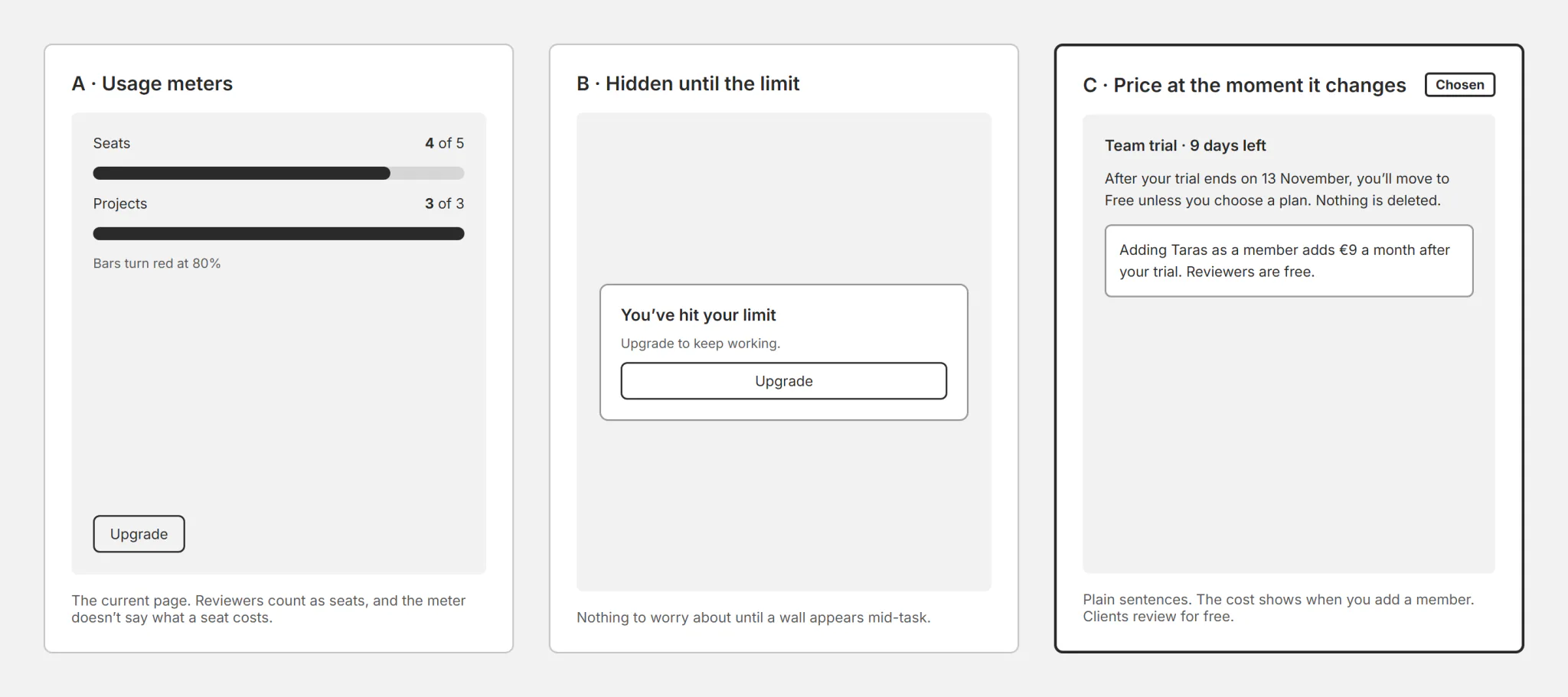
How do we show the price without scaring people?
Options: usage meters that turn red at 80%; nothing until the limit; the price at the moment it changes. I chose the third. Reviewers are free, and adding a member says “adds €9 a month after your trial”. The cost: fewer seats per paying team, 6.1 down to 5.2, and revenue per team from €55 to €47.
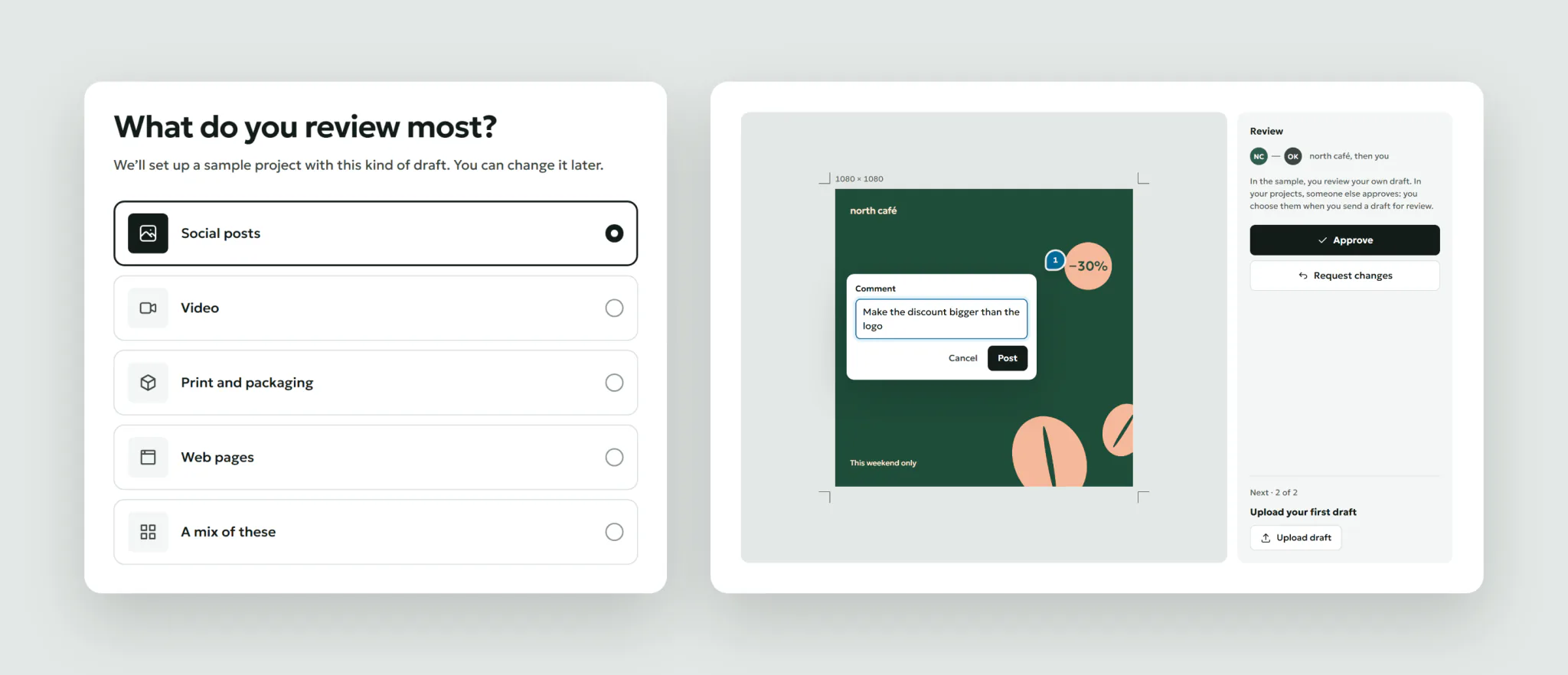
Setup that ends in a real review
Three questions, then a sample project with a draft to comment on and approve. In the sample you review your own draft, and the panel says why: in your projects someone else approves. The next step is uploading your own draft.
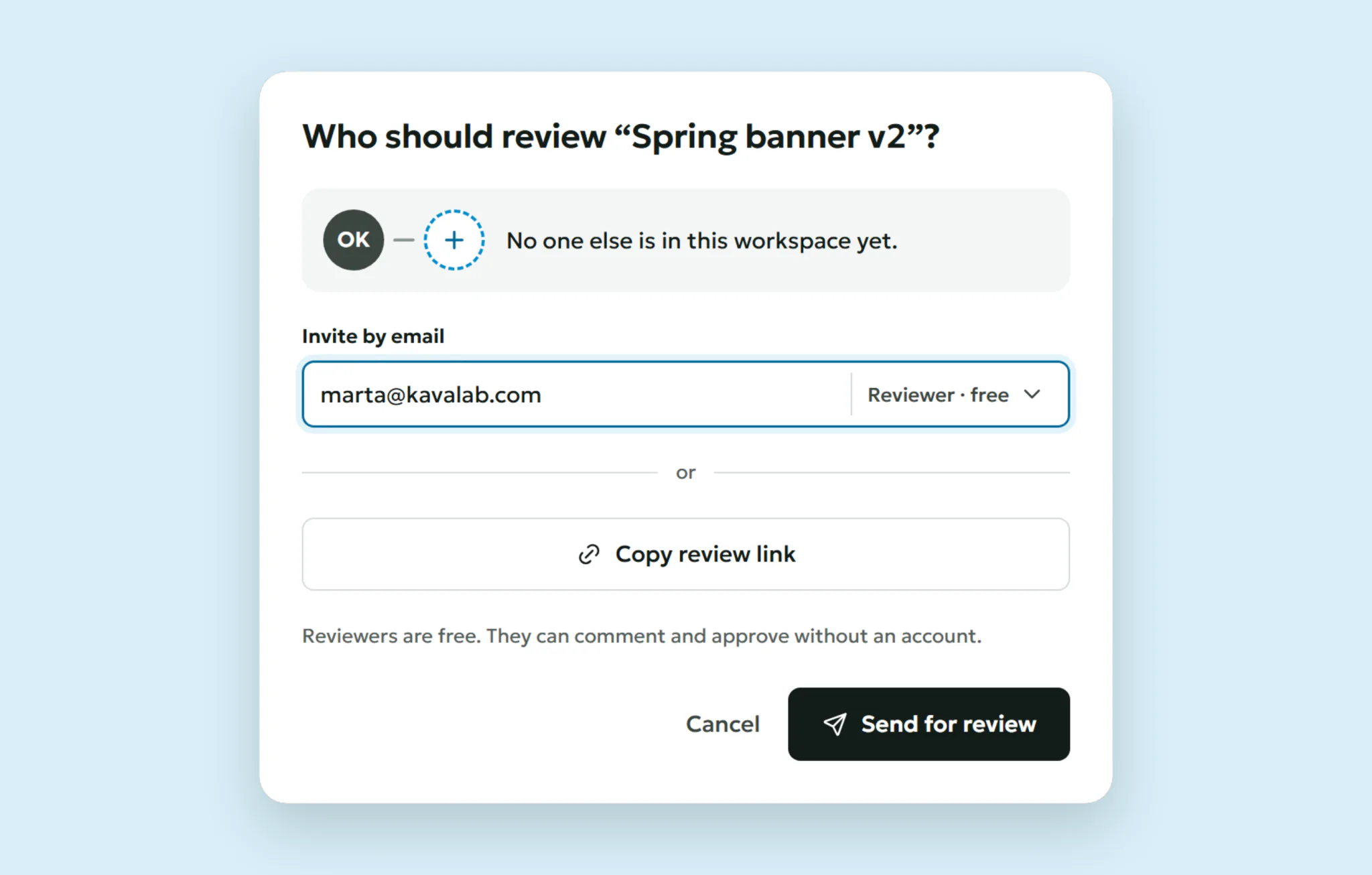
The empty seat is the invite
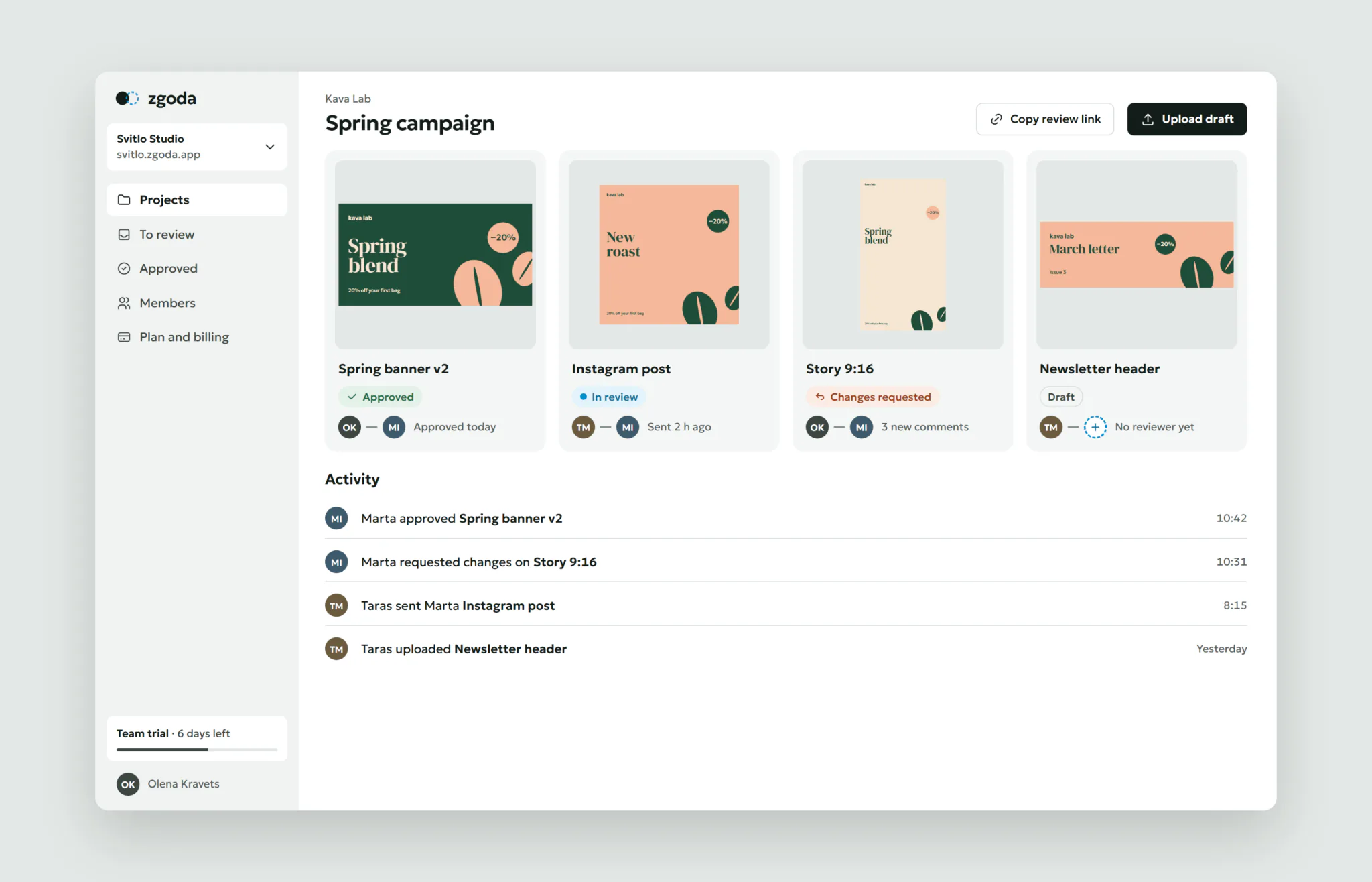
Every draft shows two seats: who made it and who decides. Until someone is invited, the second seat is a dashed circle. That pair is the product’s one memorable element. The name comes from “згода”, Ukrainian for “agreement”.
“Send for review” with nobody to send to doesn’t fail. It asks who should review, invites by email or a link, and makes the reviewer free by default.
The reviewer gets a task, not “join my workspace”: the draft, Olena’s two comments and one button. No account needed.
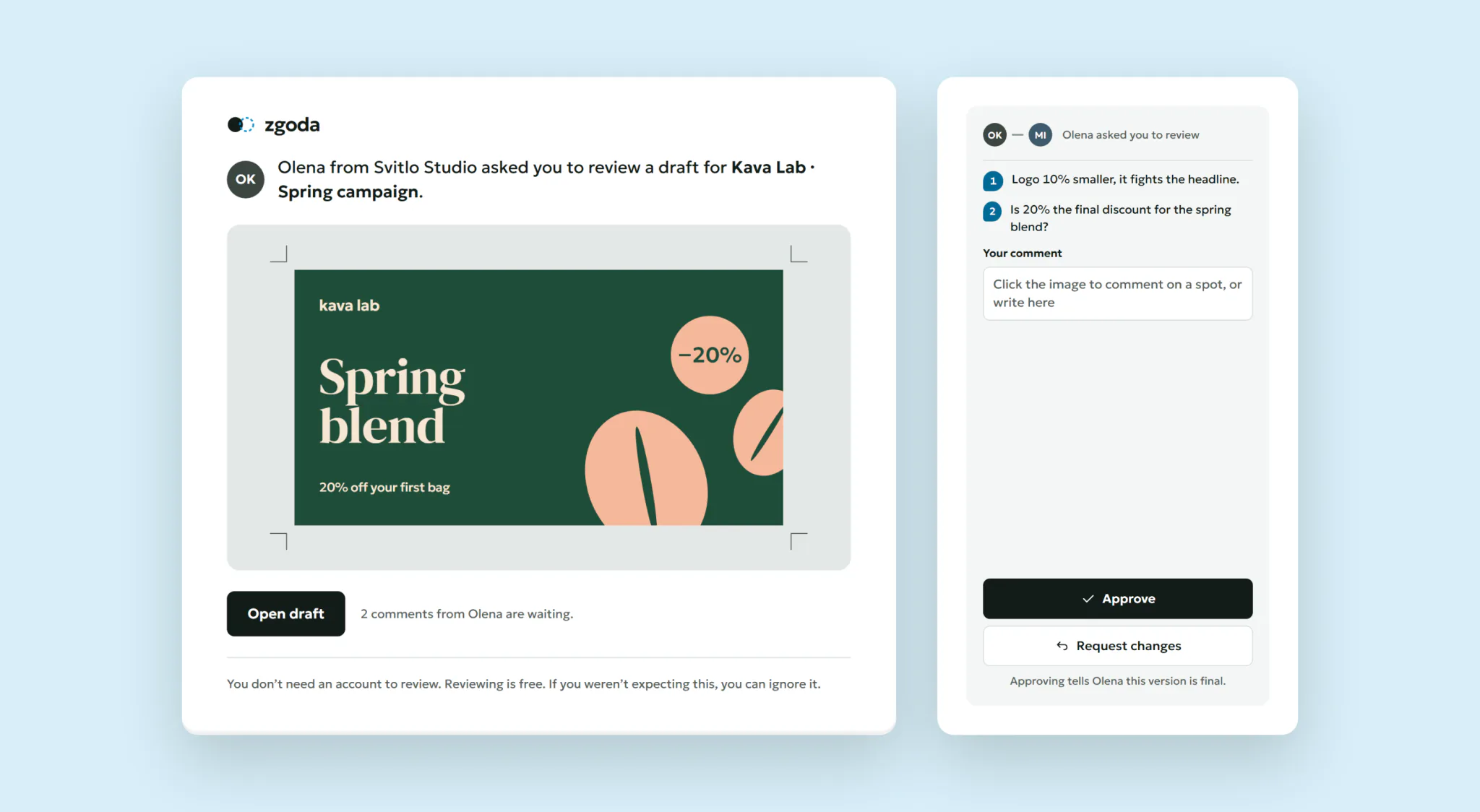
Once a second person is in, every card shows the pair, and the activity shows the loop working.
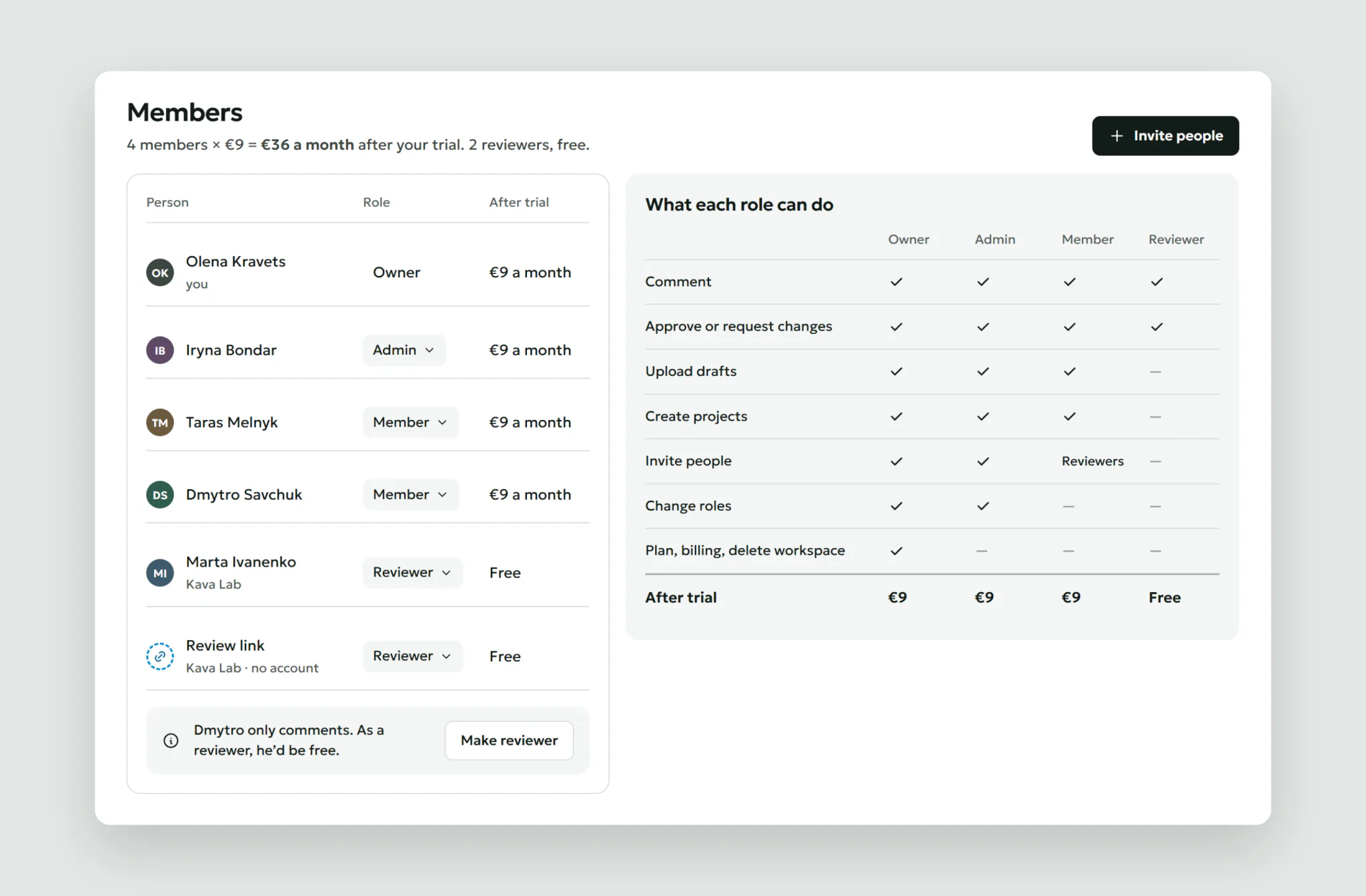
Roles that say what they cost
Owner, Admin, Member and Reviewer, each with what it can do and its price on one page. The header adds up the bill. If a member only comments, the page suggests making them a reviewer, which is free.
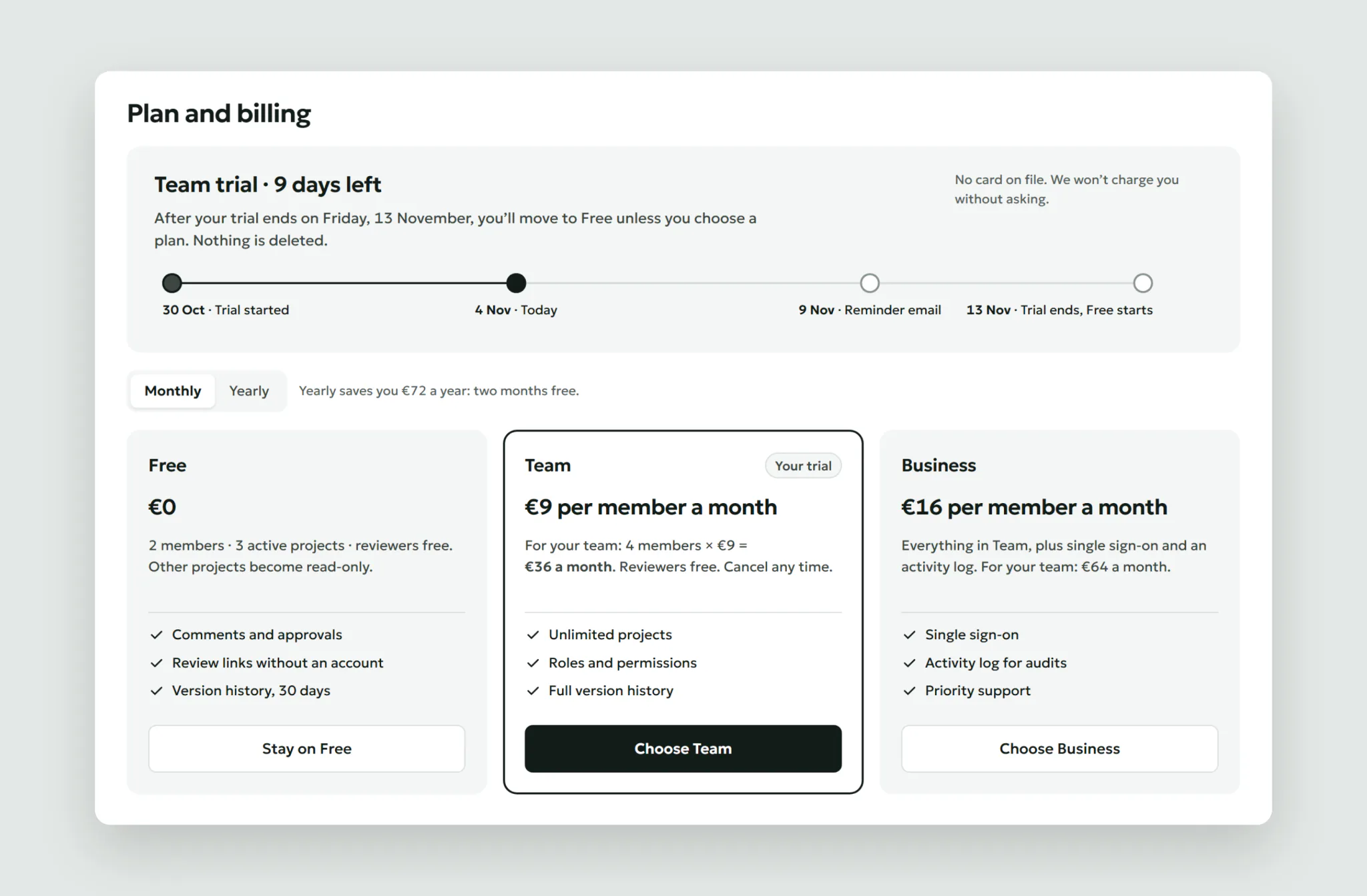
A trial that ends without a trap
The plan page names the date, what happens if you do nothing, and the bill for this team. Day 11 brings a reminder email. After 14 days the team moves to Free: extra projects become read-only, nothing is deleted. Monthly is picked by default; yearly shows its saving in euros.
States and edge cases
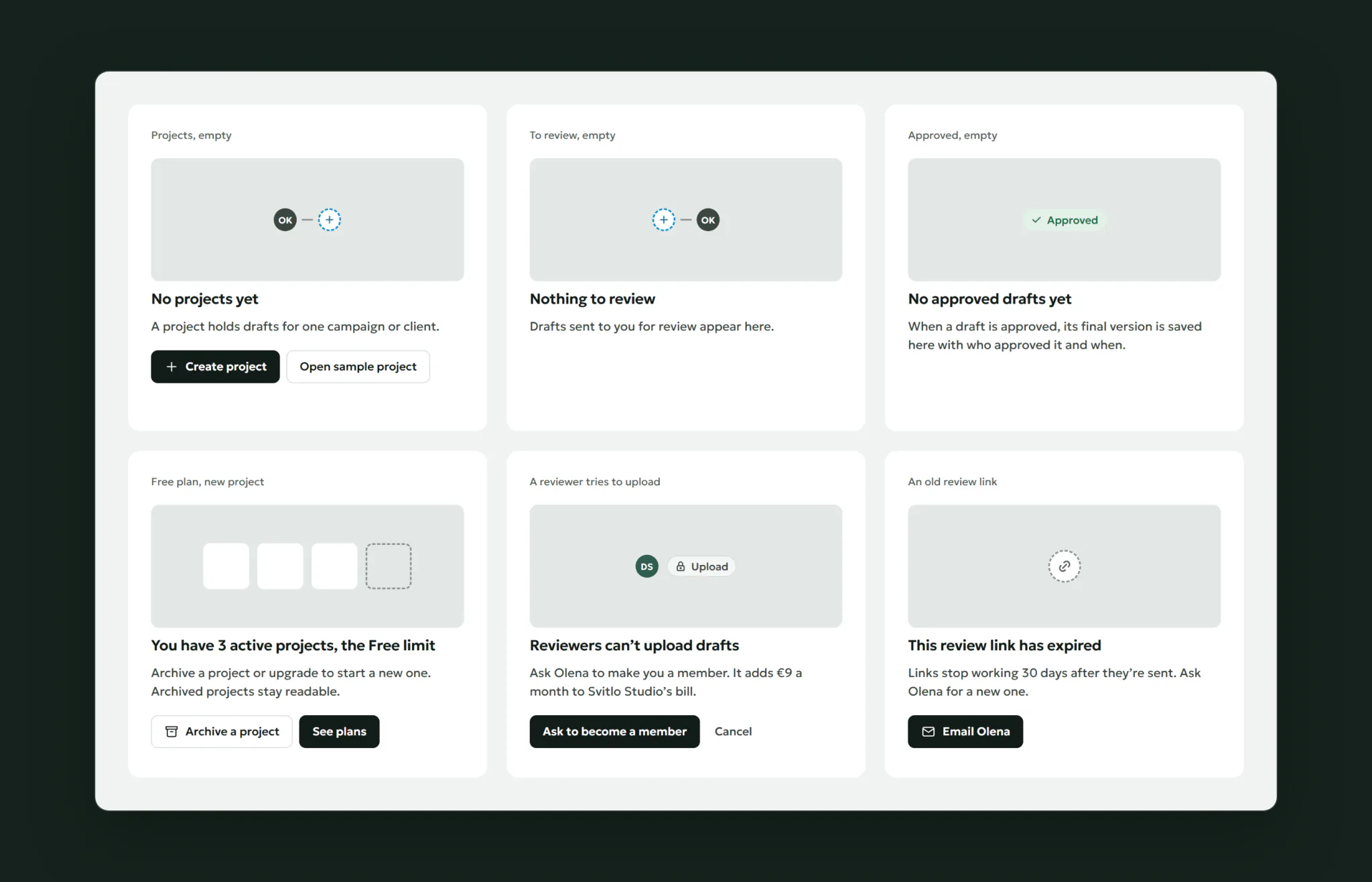
Each empty state says what will appear there and offers the first action. The Free limit offers archiving before upgrading. A reviewer who tries to upload is told why and can ask to become a member.
Result
We shipped in stages against a holdout: 15% of new trials kept the old experience the whole time. A user-level A/B test would mix people inside one team, and payment needs 30 days. Billing fixes went to everyone at once.
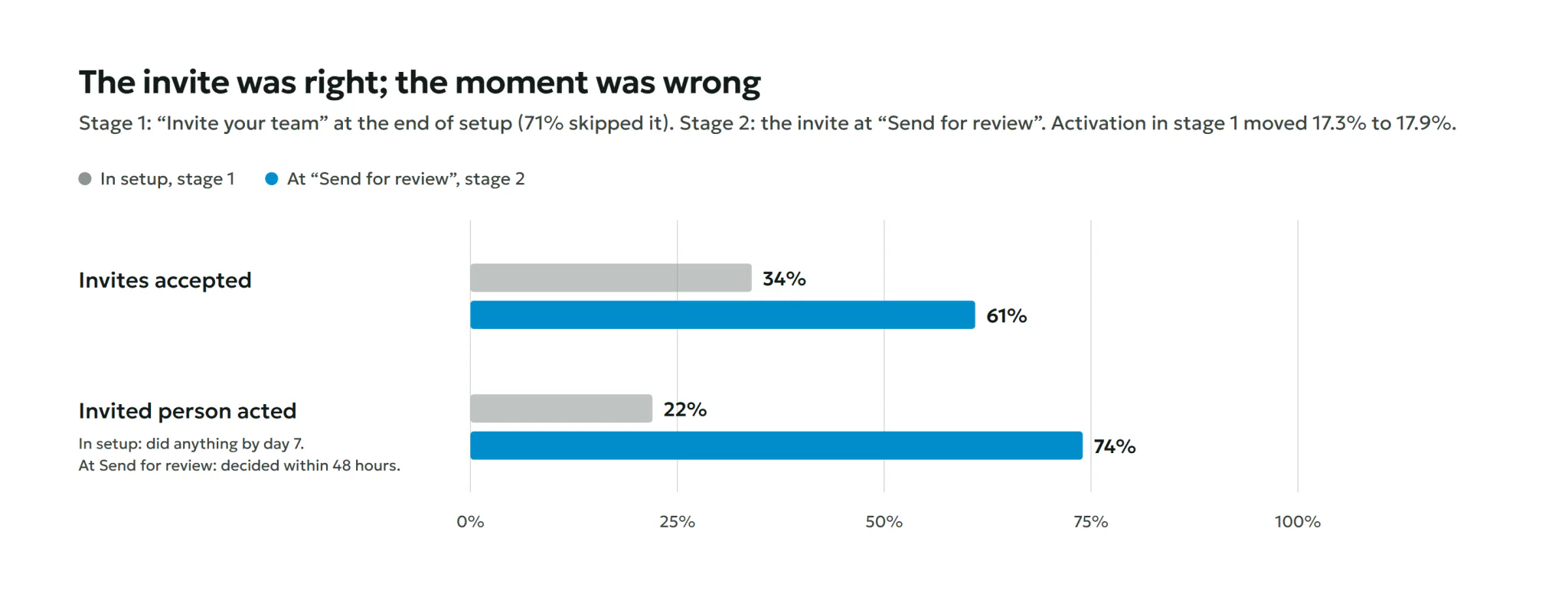
The hypothesis that failed. In stage 1, setup ended with “Invite your team”. 71% skipped it. Of the invites sent, 34% were accepted, and only 22% of those people did anything in their first week. They arrived in an empty workspace. Activation barely moved: 17.3% to 17.9% (−3.9 to +5.1 points). The invite was right, the moment was wrong.
In stage 2 the invite moved to “Send for review”. 61% of invites were accepted, and 74% of reviewers decided within 48 hours.
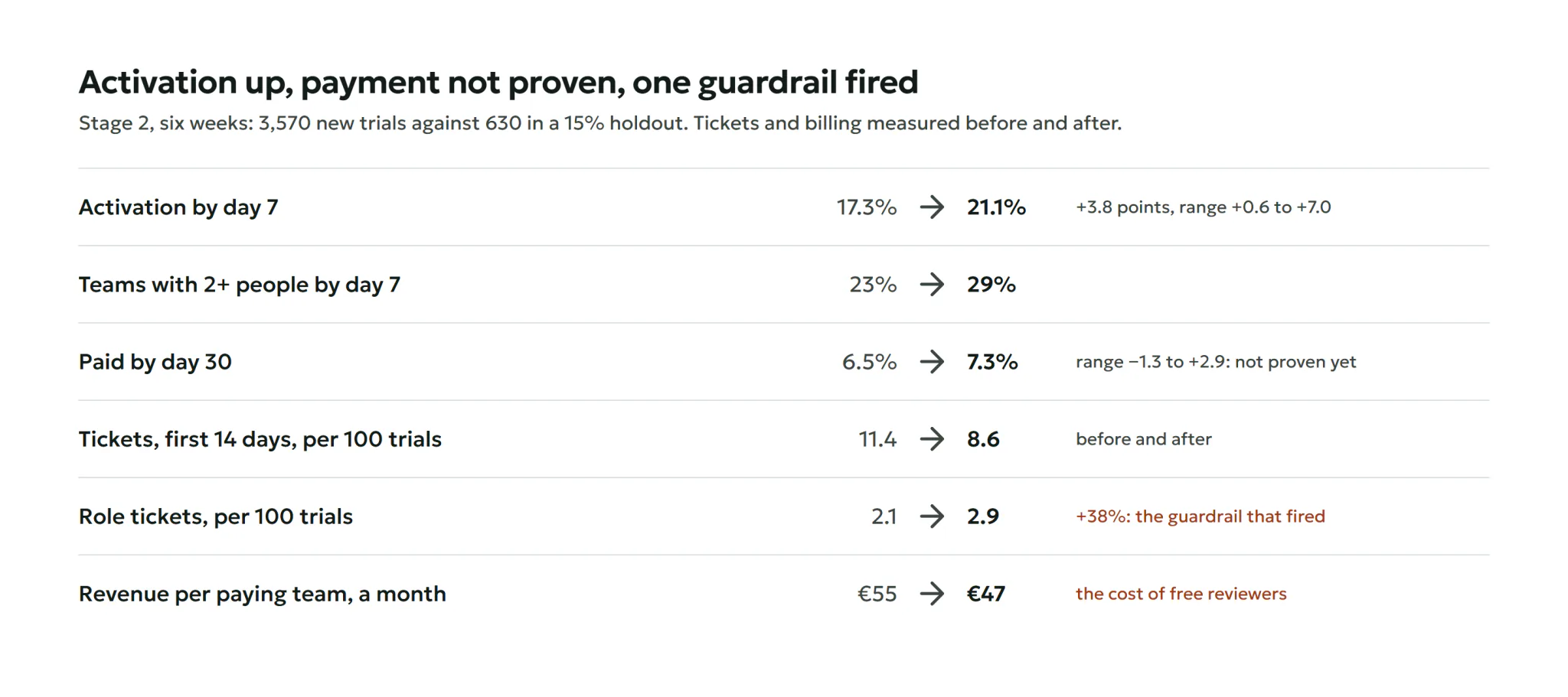
Six weeks of stage 2, 3,570 new trials against 630 in the holdout:
- Activation rose from 17.3% to 21.1%, +3.8 points (+0.6 to +7.0).
- Teams with 2+ people by day 7 rose from 23% to 29%.
- Payment by day 30 rose from 6.5% to 7.3%, but the range runs from −1.3 to +2.9 points. Not proven yet; the holdout stays another quarter.
- Support tickets in the first 14 days fell from 11.4 to 8.6 per 100 trials. Refunds after the first charge fell from 4.8% to 2.1%, measured before and after.
One number went the wrong way. Role tickets rose from 2.1 to 2.9 per 100 trials, +38%. Teams made colleagues reviewers to save €9, then those colleagues couldn’t upload. So a reviewer who tries now sees why and can ask to become a member, with the price shown to the admin.
What I learned
- Timing beats placement. The same invite failed in setup and worked when a draft needed a reviewer.
- Activation is a product decision. Choosing “a second person decided” over “invite sent” changed what we built.
- Honest pricing has a cost to plan for. Free reviewers cut revenue per team before they raised payment, and they moved the questions to roles.